FREE
Automatic Trade Import
Connect MetaTrader, cTrader, Tradovate, TradeLocker or Coinbase, and your trades sync on their own.


Import your trades automatically and see your P&L, win rate and habits in one place, so you repeat what works and cut what doesn't.
670,000+ trades journaled across 100+ trading communities







Stop tracking trades in spreadsheets. Log, review and analyze every trade in one journal that fills itself in.
Connect MetaTrader, cTrader, Tradovate, TradeLocker or Coinbase, and your trades sync on their own.
P&L, win rate, profit factor and streaks, updated every time a trade comes in.
Every trade in one searchable place, with tags, notes and screenshots to review later.
Find your best hours, holding times and trades, and see every day's P&L on a calendar.
Import trades from every market you trade
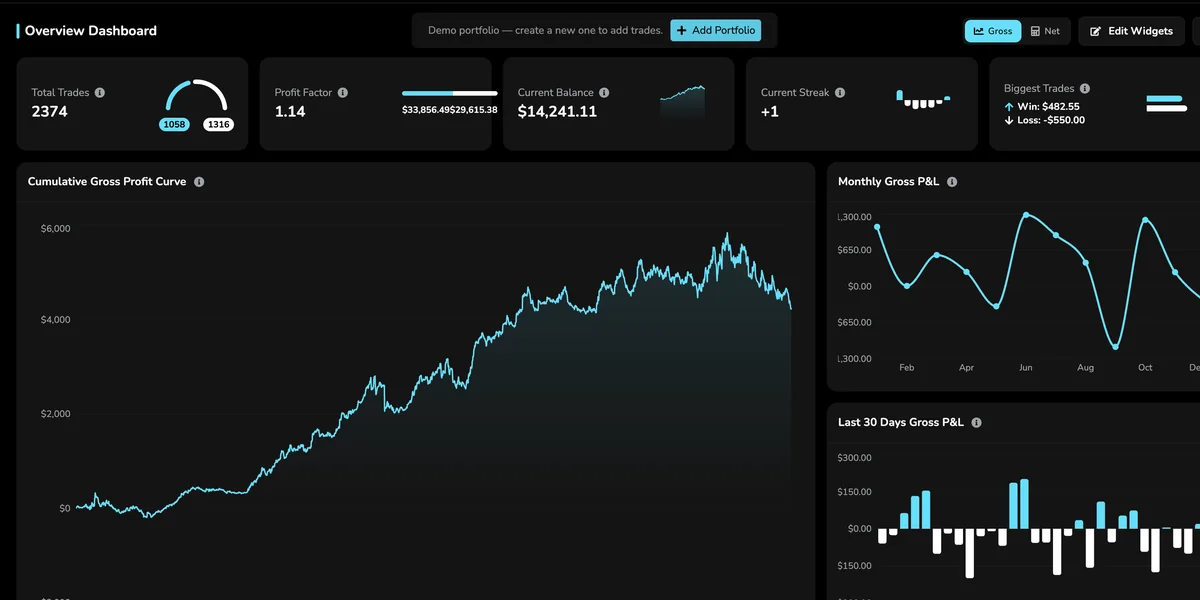
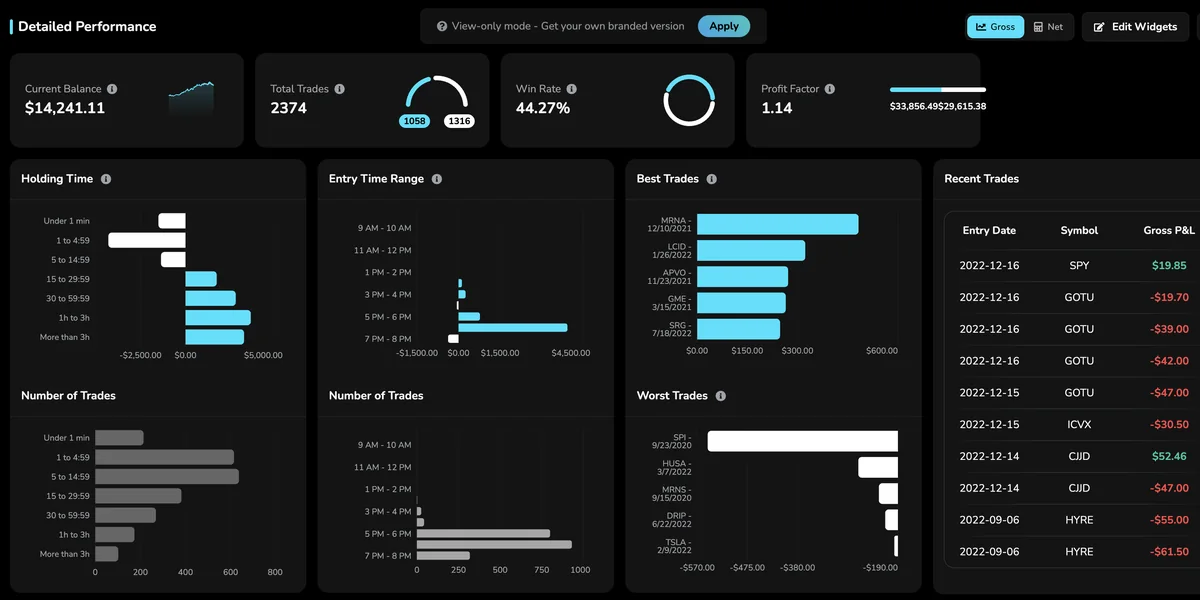
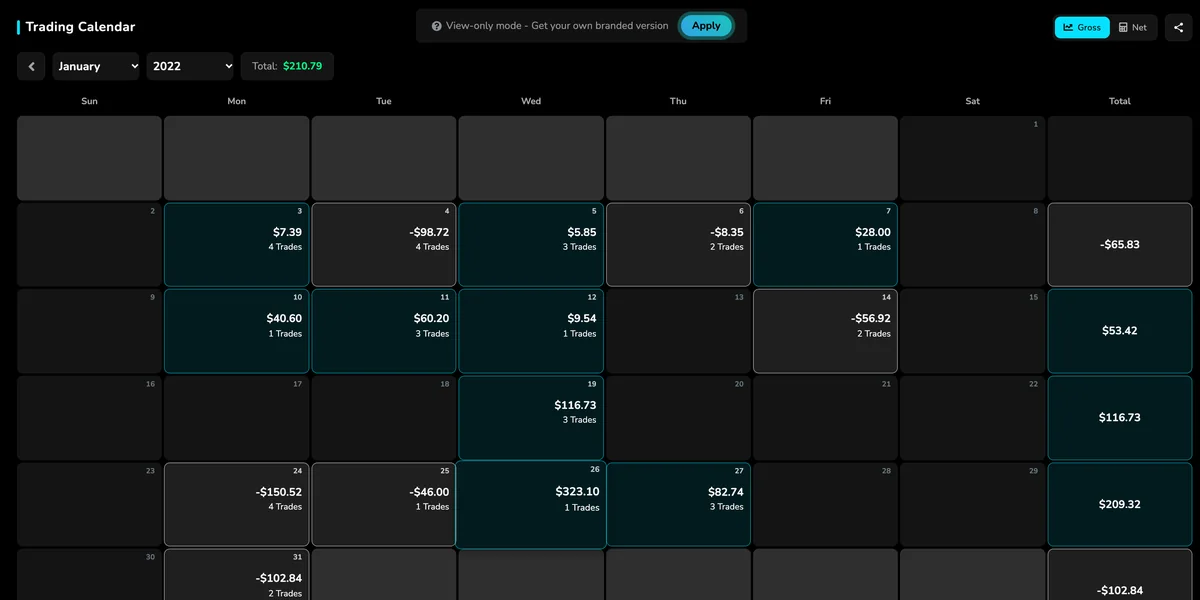
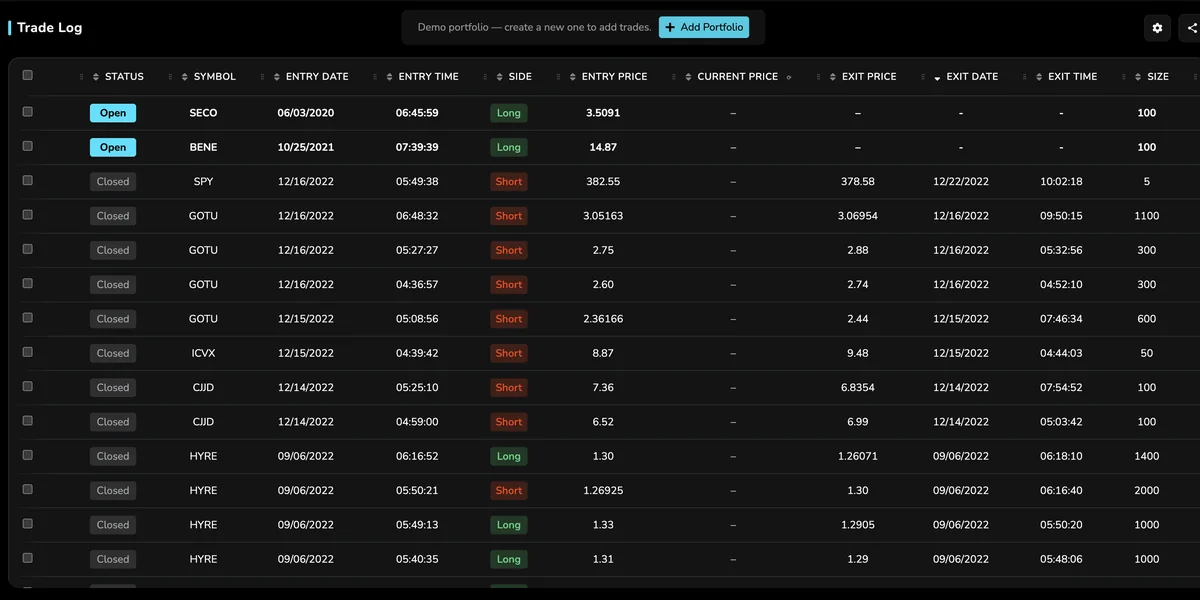
Real screens from the app, shown with the demo portfolio. Your stats, reports, calendar and trade log in one place.
Every stat that matters at a glance: profit curve, profit factor, balance and streaks.
Win rate, P&L by holding time and entry time, and your best and worst trades.
Every day's P&L and number of trades on a calendar, with a total for each week.
Every trade logged and searchable, with tags, notes and screenshots.
Everything you need to track and improve your performance, in the simplest way possible.
Connect MetaTrader, cTrader, Tradovate, TradeLocker or Coinbase and trades import on their own.
Every stat that matters at a glance: profit curve, profit factor, balance and streaks.
Win rate, drawdown, P&L by entry time and holding time, plus the best and worst trades.
See every day's result at a glance, with a daily summary of each session.
Every trade logged and searchable, with tags, notes and screenshots.
Combine filters, including your own tags, to break down results any way you want.
Upload statements from IBKR, thinkorswim, Zerodha and more as CSV, Excel or PDF.
Keep each account in its own portfolio, with deposits and withdrawals tracked.
Fully responsive, so you can review your trades from your phone, tablet or desktop.
Connect your broker once and new trades import on their own. For other brokers, upload a statement.
Connect once and new trades come in on their own.
 MetaTraderMT4 & MT5, 2,000+ servers
 cTrader
 Tradovate
 TradeLocker
 Coinbase
Upload the statement or trade history your broker exports.
 Interactive Brokers
 thinkorswim
 NinjaTrader
 Webull
 Zerodha
 TradeZero
 MEXC
MEXC Trade the Pool
Also imports TradingView paper trades. Don't see your broker? Use the Excel template or email support@tradevipe.com.
Trading educators with audiences of 100k+ run their communities on TradeVipe. Here's what they say.

Rafael Verde
TradeTrack
“Over 7,000 users in a few months with one YouTube video.”
Create your free account. No credit card needed.
Link your broker or upload a statement, and your trades come in.
Tag trades, add notes and screenshots, and check your stats after each session.
Use detailed reports and the P&L calendar to repeat what works.
Import your trades, then review your stats, reports, calendar and trade log in one place.

The free plan covers the essentials. Pro unlocks the full journal for $30 a month.
For traders starting to journal every trade.
For traders who want every report and tool in the journal.
Give your members this journal under your own name, from $50 a month.
| Feature | Free | Pro |
|---|---|---|
| Trade log with auto-import from brokers | ||
| Overview dashboard | Basic stats | Full analytics |
| Detailed analytics | ||
| Calendar with daily summaries | ||
| Portfolios | 1 | Unlimited |
| Support | Limited | Priority |
| Price | $0 forever | $30/mo |
Payments are securely processed by Stripe and Whop.
Everything you need to know about plans, brokers and imports. Clear answers before you sign up.
Yes. The free plan includes the trade log with automatic broker import, the overview dashboard and one portfolio. Pro adds detailed analytics, the P&L calendar, unlimited portfolios and priority support.
Pro is $30 a month. If you upgrade within 7 days of signing up, you get 10% off.
MetaTrader 4 and 5 (2,000+ broker servers), cTrader, Tradovate, TradeLocker and Coinbase sync automatically. For other brokers, you can upload a statement. Don't see yours? Email support@tradevipe.com.
Yes. Upload statements from IBKR, thinkorswim, Zerodha, TradingView paper trading and more as CSV, Excel or PDF, or fill in our Excel template.
Yes. The web app is fully responsive, so you can review your trades on your phone, tablet or desktop.
Yes. Each account gets its own portfolio, with deposits and withdrawals tracked. The free plan includes one portfolio, and Pro gives you unlimited portfolios.
Import your trades automatically and see what's working in your trading, and what isn't.